How to Write AI Headshot Prompts That Look Like You, Not a Stranger
September 24, 2026 · 8 min read
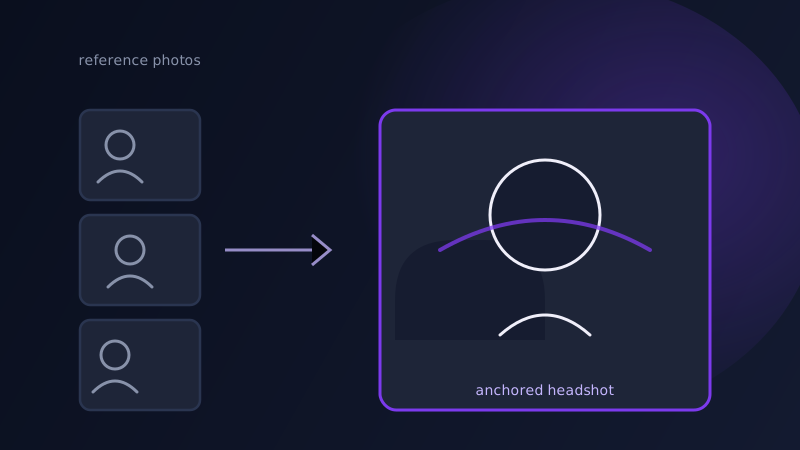
Upload a few photos, choose a style, and get a polished headshot back in minutes: that is the promise behind every AI headshot generator on the market right now. The disappointment that follows is specific and consistent. The lighting looks professional, the outfit is sharp, the background is a clean studio gray, and the person in the photo is recognizably not quite you. A chin that sits slightly wrong, eyes a shade off, a jawline that belongs to someone else wearing your haircut. The fix usually is not a different generator. It is a different way of prompting the one you already have, because a headshot prompt has one job an ordinary image prompt does not: it has to preserve one specific, identifiable face while changing almost everything else in the frame.
Why AI headshot tools drift away from your actual face
Most image generators were built to produce a face that looks plausible, not a face that matches a specific person, because plausibility is what nearly every other use case needs. A prompt describing "a confident woman in a navy blazer, studio lighting" gives the model everything it needs to generate a convincing headshot of someone, and the model has no reason to prefer your bone structure over any other bone structure that fits the description equally well. The model is not failing at the prompt. It is succeeding at a prompt that never actually specified whose face this needs to be. Likeness is not a style, a mood, or a lighting setup, so describing it the way you would describe those things does not work. It has to be anchored by something the model can actually check itself against: real reference photos of you.
The reference photos matter more than the prompt text
Before touching the wording of the prompt itself, the single highest-leverage decision in an AI headshot is which photos you upload as reference. Most headshot generators and character-reference features, Midjourney’s --cref flag among them, work by anchoring generation to one or more source images, and the quality of that anchor matters more than any adjective in the prompt. Use several photos, not one, and vary the angle: a straight-on shot, a slight three-quarter turn, and one with a different expression give the model more of your actual geometry to work from than five nearly identical selfies do. Avoid photos with heavy filters, unusual lighting, or an extreme angle, since those get baked into the identity the model extracts just as much as your actual features do. A single flattering but heavily edited photo is worse reference material than three plain, well-lit ones.
What actually belongs in the prompt itself
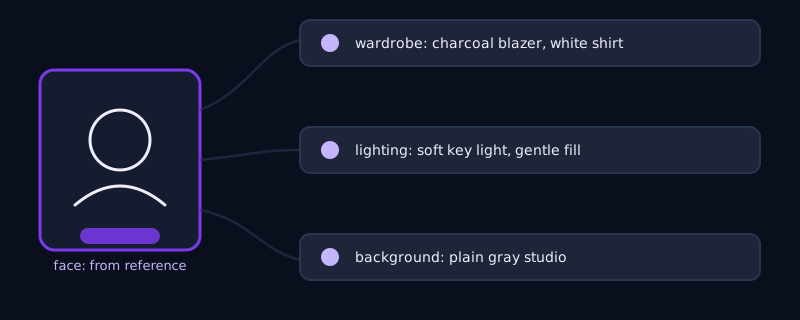
Once the reference is doing the work of preserving your face, the prompt text has a narrower and more honest job: everything around the face. That means wardrobe ("charcoal blazer over a white shirt, no tie"), setting ("studio backdrop, soft gray gradient" or "modern office, blurred background"), lighting ("soft key light from the left, gentle fill, no harsh shadows"), framing ("head and shoulders, centered, looking slightly off camera"), and the overall register you are going for, since "corporate LinkedIn headshot" reads very differently from "casual founder portrait" or "creative agency team photo." Naming the platform or context you are shooting for, rather than describing a vague aesthetic, does more work than most people expect. The word "professional" alone is not specific enough to reliably distinguish a corporate law-firm headshot from a startup team page photo, but naming the actual context usually is.
Wardrobe, background, and lighting: keep them separate from the face
A mistake specific to headshot prompting is over-describing the face itself once a strong reference photo is already anchoring it. Adding detailed facial descriptors on top of a reference image, "sharp jawline, high cheekbones, symmetrical features," tends to pull the output away from your actual face and toward the generic version of "sharp jawline" the model has learned from training data, fighting the very reference photo that was supposed to preserve your likeness. The face should be handled almost entirely by the reference image; the prompt text should stay focused on what a reference photo usually cannot specify well on its own: wardrobe, setting, lighting, and framing. Where a tool lets you set reference-image strength as a separate parameter rather than a written description, push that value up before adding more words about the face, since the parameter is doing a job the sentence cannot.
A worked example
Reference: three well-lit photos of the same person, front-facing, a slight turn, and a natural smile, none heavily filtered. Prompt for a corporate LinkedIn headshot: "Professional corporate headshot, navy suit jacket, white shirt, plain light gray studio background, soft even studio lighting, head and shoulders framing, looking directly at camera, neutral confident expression, high resolution, photographic." Same reference, different context, prompt for a creative agency team page: "Casual professional portrait, dark sweater, warm natural window light, softly blurred modern office background, head and shoulders, slight three-quarter angle, relaxed genuine smile, editorial photography style." The face stays anchored by the same reference photos in both cases. Only the wardrobe, lighting, background, and framing language changes, which is exactly the split that produces two photos that both look like the same real person in two different professional contexts, rather than two different people who happen to share a haircut.
Common mistakes
Uploading a single reference photo, especially a heavily filtered or unusually angled one, and expecting the model to reconstruct an accurate likeness from it. Piling detailed facial descriptors into the prompt on top of a reference image, which pulls the result toward a generic face instead of reinforcing yours. Writing "professional" and stopping there instead of naming the actual context, a corporate headshot, a casual founder photo, a creative team page, since each implies a genuinely different wardrobe and lighting choice. Treating wardrobe and background as an afterthought when they are actually most of what the prompt text controls once a reference photo is anchoring the face, and skipping multiple reference angles when a tool supports them, one of the few genuinely free upgrades available in headshot prompting.
Frequently asked questions
Why does my AI headshot generator keep changing my face?
Because most image models are optimized to produce a plausible face, not to match a specific one, and a written description alone cannot pin down your exact features. The fix is providing several clear, unfiltered reference photos from different angles and letting a reference-image or character-reference feature anchor the face, while keeping the prompt text focused on wardrobe, lighting, and background instead of describing the face itself.
How many reference photos should I upload for the best likeness?
More than one, ideally three or more, showing different angles and at least one different expression. A single photo, especially a filtered or unusually angled one, gives the model too little to reconstruct your actual geometry from, while several plain, well-lit photos taken from slightly different angles give it real information to anchor to.
Should I describe my face in the prompt if I am already uploading a reference photo?
Generally no. Once a reference photo is anchoring the face, adding detailed facial descriptors in the prompt text tends to pull the result toward a generic version of those descriptors rather than reinforcing your actual features. Let the reference image handle the face and use the prompt for everything it cannot specify well: wardrobe, background, lighting, and framing.
What is the difference between prompting for a corporate headshot versus a casual professional photo?
Mostly wardrobe, lighting, and background language, not the face. A corporate headshot prompt typically calls for a blazer, plain studio background, and even studio lighting, while a casual professional portrait calls for softer wardrobe, natural or window light, and a blurred real-world background. Naming the actual context, a LinkedIn headshot, a startup team page, a creative portfolio, gets a more accurate result than a vague word like "professional" on its own.
Try Promptima’s photo prompt builder, describe the context once and get a headshot prompt tuned for your tool →
✦ Try Promptima freeMore articles

Best AI Prompt Optimizer Tools in 2026 (And When to Use Each)
Prompt marketplaces, browser extensions, manual prompt engineering, and dedicated optimizers all solve a different version of the same problem. Here is how to tell which one you actually need.

How to Turn One Photo Into a Ready-to-Use AI Video Prompt
You have an image whose look you want to bring to life as a video. The problem is that video AI tools don’t read image prompts — they need camera, motion, and duration described in a completely different structure. Here’s how to bridge the two.