How to Get Readable Text in AI-Generated Images
October 8, 2026 · 8 min read
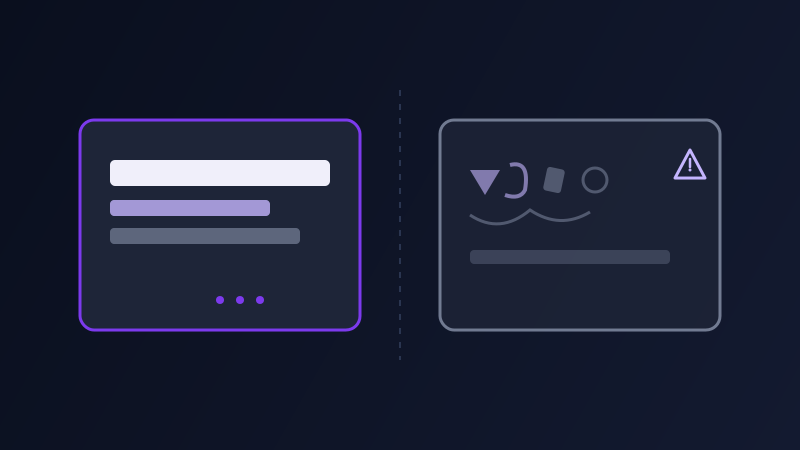
Ask almost any AI image tool for a street sign that says "OPEN" or a birthday cake with a name piped in frosting, and you will see the same failure pattern: letters that are almost right, word shapes that look like text from a distance but fall apart the moment you read them closely, extra or missing characters, mirrored letters, a word that was spelled correctly in the prompt and not in the output. This is not a bug in any one tool, it is a structural limitation of how image models learn. They learn the visual shape of text from millions of images, not the rules of spelling or an actual character set, so they are reproducing what text generally looks like rather than composing it letter by letter. Knowing that distinction changes how you prompt around it.
Why image models struggle with text in the first place
A language model like ChatGPT or Claude generates text one token at a time with an explicit vocabulary, which is why it can spell perfectly. An image diffusion model generates pixels, and whatever text appears in the output is a visual pattern the model learned to associate with certain prompts, not a string it is actually typing out. Short, common, highly repeated words, STOP, OPEN, SALE, a single first name, show up constantly in the model's training images, so the model has seen that exact shape thousands of times and reproduces it reliably. A long sentence, an uncommon name, or a word in a less common font style has far fewer training examples to draw from, so the model is guessing at a plausible-looking shape rather than recalling a familiar one, and that is exactly where the garbling happens.
The single biggest lever: keep it short
Length is the most reliable predictor of whether text renders cleanly. A single word or a two-to-four word phrase has a real shot at coming out legible on most current image models. A full sentence, a tagline longer than about six words, or a paragraph of body copy is pushing well past what any current model reliably renders, no matter how precisely you describe the font or layout around it. If the idea needs more than a short phrase, the better move is almost always to generate the image without that longer text and add it afterward in a design tool, rather than fighting the model for five tries hoping the sixth one spells it correctly.
Put the exact text in quotes
Models trained on image-caption pairs learn a pattern where quoted text in a caption corresponds to literal text rendered in the image, so wrapping your target text in quotation marks inside the prompt, a neon sign reading "LATE NIGHT", a mug with "WORLD'S OKAYEST COOK" printed on it, gives the model a stronger, more literal signal than writing the same words as plain unquoted prose. It is a small change in punctuation that measurably improves hit rate across most current text-to-image tools, including the ones that are generally strongest at text rendering, like GPT Image and Ideogram.
Specify where the text sits and how much space it has
Unconstrained text has to compete with everything else in the frame for space, and a model under space pressure is more likely to compress, overlap, or clip the letters. Telling the model where the text lives and how much of the frame it is allowed to take up, "a small embroidered patch on the left sleeve reading 'CREW'" instead of just "a jacket with 'CREW' on it", gives the text room to render at a size where its own structure holds together, rather than squeezing into whatever gap is left after the model finishes everything else in the scene.
Which tools actually render text well
There is a real, current gap between tools on this specific capability, and it is worth knowing before you pick one for a text-heavy job. GPT Image and Ideogram are consistently the strongest options for legible on-image text today, both were built with text rendering as an explicit design goal rather than an incidental capability. Midjourney and Stable Diffusion-based models have improved steadily but still fail more often on anything past a short word or two, and older or smaller open-source checkpoints are the least reliable of the group. If a job genuinely needs a sentence-length tagline rendered inside the image itself rather than added afterward, routing it to a text-first tool will save far more attempts than tweaking the wording of the same prompt on a tool that was never built for this.
When to stop fighting the model and composite it instead
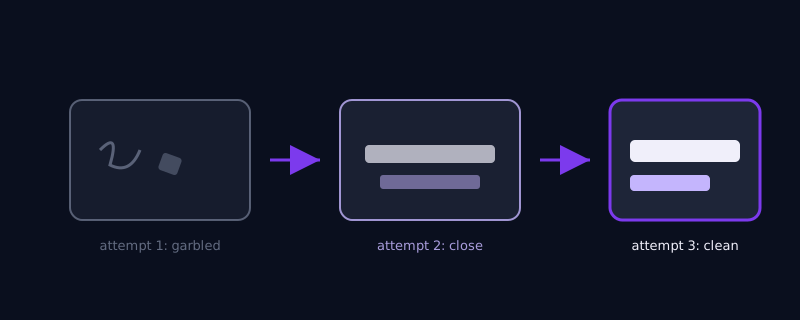
If you have tried a short phrase, quoted it, given it room, and it is still coming out wrong after three or four attempts, that is the signal to stop iterating on the prompt and instead generate the image without any text at all, then add the text in a layer on top using any basic design tool. This is not a failure, it is how most professional work with AI-generated text actually gets done, because a real typeface set by a human, or placed with a type tool, will always be sharper and more controllable than anything a diffusion model composes pixel by pixel. Reserve in-model text generation for cases where the organic, slightly imperfect look of baked-in text is actually part of the aesthetic, a weathered sign, a hand-painted mural, rather than for anything that needs to read as crisp, professional typography.
Common mistakes
Asking for a full sentence or a multi-line paragraph and expecting the same hit rate as a single word. Typing the target text in plain prose instead of wrapping it in quotation marks. Leaving placement and size unspecified so the text has to compete for space with everything else in the frame. Picking a tool based only on its general image quality without checking whether text rendering specifically is one of its strengths. And generating ten variations of the same garbled phrase instead of switching to a composite approach after the first few attempts clearly are not working.
Where Promptima handles this
Knowing how short a phrase needs to be, when to add quotation marks, and which current tool is actually strong at text rendering is exactly the kind of detail that keeps shifting as models update. Promptima's image prompt generator checks any on-image text you want against the target tool's known strengths, tightens overly long phrases, and adds the structural cues, quoting, placement, scale, that give your target model its best realistic shot at getting the words right.
Frequently asked questions
Why does AI-generated text come out garbled even when my prompt spells it correctly?
Because image models generate pixels, not characters. They learn the visual shape of text from training images rather than an explicit alphabet, so they are reproducing a plausible-looking pattern rather than typing out your exact spelling. Short, common words have more training examples to draw from and render more reliably; long or uncommon phrases are more likely to come out as a shape that merely resembles text.
Which AI image tools are best at rendering readable text?
GPT Image and Ideogram are currently the strongest options, both were built with text rendering as an explicit design priority. Midjourney and most Stable Diffusion-based tools have improved but are still noticeably less reliable past a short phrase, and older or smaller open-source checkpoints are the least consistent of the group.
How long can text be before an AI image tool struggles to render it?
A single word or a short two-to-four word phrase has the best chance of coming out legible on most current tools. Anything approaching a full sentence is well past what current models reliably render, regardless of how the rest of the prompt is written, and is usually better added afterward in a design tool instead.
Should I just add text in Photoshop instead of trying to get the AI to render it?
For anything longer than a short phrase, or anything that needs to read as crisp professional typography, yes. Generate the image without the text and composite a real typeface on top. Reserve in-model text generation for short phrases or for cases where the slightly imperfect, organic look of baked-in AI text is actually part of the intended aesthetic, like a weathered sign or a hand-painted mural.
Try Promptima's image prompt generator, which structures the wording, placement, and length of any on-image text so your target tool has the best possible shot at rendering it clean →
✦ Try Promptima freeMore articles

Best AI Prompt Optimizer Tools in 2026 (And When to Use Each)
Prompt marketplaces, browser extensions, manual prompt engineering, and dedicated optimizers all solve a different version of the same problem. Here is how to tell which one you actually need.

How to Turn One Photo Into a Ready-to-Use AI Video Prompt
You have an image whose look you want to bring to life as a video. The problem is that video AI tools don’t read image prompts — they need camera, motion, and duration described in a completely different structure. Here’s how to bridge the two.