Fixed Seed vs. Random Seed: What Reproducibility Actually Buys You in AI Image and Video Generation
September 29, 2026 · 9 min read
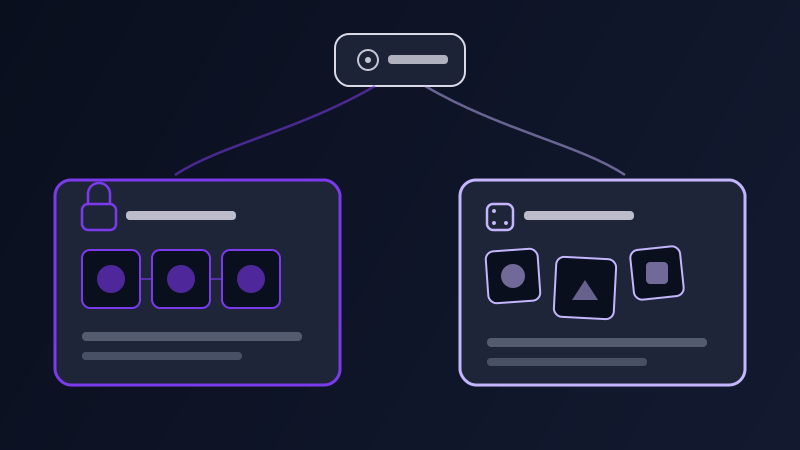
Generate the same prompt twice in most AI image or video tools and you get two different results — sometimes close, sometimes nothing alike. That is the default, random-seed behavior almost every tool ships with, and it is invisible right up until the moment you need the opposite: a result you can reproduce, tweak by exactly one word, or hand to someone else with a guarantee they will see what you saw. That is what a seed is for. It is also, consistently, the most overestimated control in AI generation — people fix a seed expecting it to lock a character, a composition, or a style in place across an entire project, and then conclude the tool is broken when it does not. A seed does something real. It just does far less than it looks like it should.
What a seed actually is
Diffusion-based image and video models do not start from nothing — they start from a field of random noise and gradually refine it, step by step, into the final output, guided at each step by your prompt. The seed is the number that determines exactly what that starting noise looks like. Feed a model the same seed, the same prompt, the same model version, and the same generation settings, and it walks the same path from the same starting point, landing on the same (or a near-identical) result. Change the seed and leave everything else untouched, and the model starts from a different noise field and takes a different path to a different, but similarly prompted, result. That is the entire mechanism: a seed does not encode meaning, style, or content — it encodes a starting point. Everything about what the output actually looks like still comes from the prompt and the settings sitting alongside it.
What a fixed seed does and doesn’t guarantee
A fixed seed guarantees exact reproducibility under one condition: every other input has to stay identical too — the prompt text, the model version, the resolution or aspect ratio, and any sampler or step-count settings the tool exposes. Under that condition, a fixed seed is genuinely powerful: it turns "regenerate and hope" into "change one variable and see exactly what moved." Swap a single adjective, keep the seed locked, and the resulting difference in the image tells you what that adjective actually did — a kind of controlled experiment that a fresh random seed makes impossible, because you can never tell whether a changed result came from your edit or from the new starting noise. What a fixed seed does not guarantee is anywhere near as important. It does not survive a model version update, since a new model version walks a genuinely different path from the same starting noise. It does not transfer between tools — a Midjourney seed means nothing typed into Stable Diffusion or Flux. And on its own, it does not hold a character, a face, or a product design consistent across a set of otherwise-different prompts; the seed only reproduces the *exact* combination it was generated with, and the moment you change the scene, pose, or framing to build a genuinely new image, the seed has nowhere near enough information left to keep anything about the subject the same.
When random is actually the better default
Random seeds are the default for a reason, and it is not laziness on the tool’s part — for most of what people actually use these tools for, variation is the point. Early exploration, brainstorming a visual direction, generating a batch of options to choose from, testing whether a prompt idea works at all: all of these want the model to sample a different starting point every time, because seeing five different interpretations of the same prompt tells you more about what the prompt is actually capable of than five near-identical copies would. Locking a seed too early in a project has a real cost — it anchors every subsequent generation to one specific roll of the dice before you have any evidence that roll was a good one. The right sequence for most projects is random first, fixed second: generate freely with a random seed until you land on a result whose composition or overall feel you like, and only then pin its seed down for the deliberate, controlled edits that follow.
Seed behavior across image tools
How much control you get over a seed varies sharply by tool, and it maps closely to how much other parameter control that tool exposes in general. Midjourney gives you an explicit --seed flag you can type at the end of a prompt, along with a way to retrieve the seed of a result you already generated, making it straightforward to lock in and reuse. Stable Diffusion interfaces, whether a local install or a hosted UI, treat the seed as a first-class, always-visible field precisely because reproducibility and fine-grained control are the entire premise of that ecosystem — the seed sits right next to the sampler and step-count settings it depends on. Natural-language-first tools go the other direction: ChatGPT’s image generation and Adobe Firefly’s consumer interface expose no user-facing seed control at all, because those tools are built around a conversational, iterative back-and-forth rather than a reproducible pipeline, and "regenerate" is the closest equivalent they offer. Tools positioned in between, Ideogram and Leonardo among them, tend to surface a seed in an advanced-settings panel rather than the main prompt box — present, but clearly treated as a power-user feature rather than something every generation is expected to touch.
Why video tools treat seeds differently
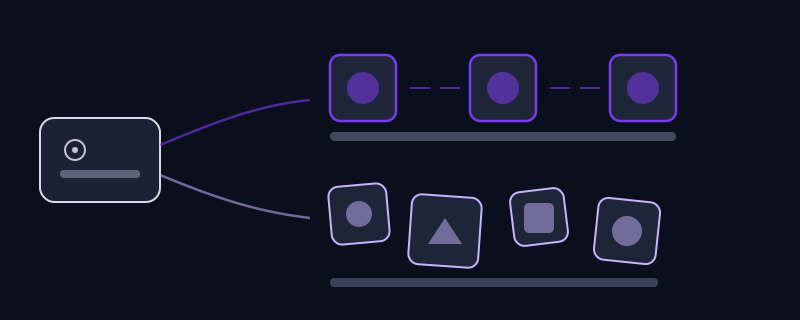
Video adds a second source of randomness on top of the one images already have: motion. Even a video model that started from a fixed image-level seed still has to sample how that scene moves across every subsequent frame, so a seed alone is a much weaker reproducibility guarantee for video than it is for a still image. Partly for that reason, most consumer-facing video tools — Runway, Kling, Sora, Veo, Luma, and Pika among them — don’t expose a user-facing seed control at all; generation happens from an internal seed you never see and can’t reuse. That pushes reproducibility in video toward different mechanisms entirely: locking the source reference image rather than a seed number, reusing the exact same prompt text word for word, and relying on a tool’s camera-motion or motion-strength parameter, where one exists, to keep the *type* of movement consistent even when the precise motion path still varies between attempts. If a video tool does surface a seed, treat it the way you would an image seed used for a controlled edit, not as a promise that two generations from it will look identical — it narrows the range of variation, it doesn’t eliminate it.
Common mistakes
Fixing a seed before you’ve generated anything, on the assumption that it locks in quality along with reproducibility — a bad first roll fixed by seed just gives you a reproducibly bad result. Expecting a fixed seed to carry a character or product design across a set of prompts that otherwise change scene, pose, or lighting, when the seed only reproduces the exact original combination it came from. Copying a seed number from one tool into another and expecting any relationship between the two outputs, when seeds have no meaning outside the specific model and pipeline that generated them. Treating a seed change as the only thing that moved between two generations, when a tool’s underlying model version was quietly updated in the background — the same seed on a new model version is not the same starting point anymore. And forgetting that a seed is only one of several inputs that must match exactly for reproducibility — the resolution, aspect ratio, and sampler settings all have to hold steady too, or the seed is reproducing a different equation than the one you think it is.
A practical workflow for using a seed well
Generate the first pass with a random seed, and generate more than one option before judging any of them — the whole point of leaving the seed unset at this stage is seeing the actual spread of what the prompt produces. Once a result’s composition and overall feel earns a closer look, pin down its seed and switch to single-variable edits from there: change one word, one lighting term, one material, regenerate, and compare directly against the locked-seed baseline to see exactly what that one change did. When the edit you actually want requires changing the scene, framing, or subject pose substantially rather than a single descriptive word, treat that as a new generation and let the seed go — fighting to preserve continuity through a fixed seed at that point usually produces a worse result than starting fresh and describing the new scene as clearly as possible. And before sharing a seed with a collaborator or trying to reuse one from an earlier session, confirm the model version hasn’t changed underneath it, since that one detail quietly breaks more "identical" reproductions than anything else on this list.
A seed is a narrow, mechanical tool for a narrow, mechanical job: giving you back the same starting point so a change you make to the prompt is the only thing that moved. It was never going to hold a character consistent, guarantee quality, or survive a jump to a different tool or model version — and expecting it to do any of that is what makes a seed feel unreliable when the actual behavior, once you know what it is really doing, turns out to be entirely predictable.
Frequently asked questions
What is a seed in AI image and video generation?
The seed is the number that determines the starting random noise a diffusion model refines into its final output. The same seed, prompt, model version, and settings produce the same or a near-identical result every time; change any one of those and the output changes too, even with the seed held fixed.
Does fixing the seed keep a character or product design consistent across different prompts?
Not reliably on its own. A fixed seed only reproduces the exact combination of prompt and settings it was generated with. The moment you change the scene, pose, or framing to build a genuinely different image, the seed has nowhere near enough information left to hold the subject’s appearance steady — that needs a dedicated character-consistency approach, not just a locked seed.
Can I reuse a seed from one AI tool in a different one?
No. A seed only has meaning inside the specific model and generation pipeline that produced it. A Midjourney seed typed into Stable Diffusion, Flux, or any other tool does nothing useful — each tool’s seed values are tied to its own internal process and don’t transfer.
Why don’t most AI video tools let me set a seed?
Video adds motion on top of the randomness a still image already has, so a seed alone is a much weaker reproducibility guarantee for video than for an image. Most consumer video tools — including Runway, Kling, Sora, Veo, Luma, and Pika — generate from an internal seed you never see, and rely on a locked reference image or consistent prompt wording instead for repeatable results.
When should I use a random seed instead of a fixed one?
Use a random seed for early exploration — brainstorming a direction, generating a batch of options, or testing whether a prompt idea works at all — since variation is the point at that stage. Switch to a fixed seed only once a result’s composition earns a closer look, so you can isolate exactly what a single, deliberate prompt edit changes.
Try Promptima’s prompt optimizer — when you tweak one detail, it keeps the rest of the prompt structure intact instead of rewriting it from scratch, so you can actually tell what changed →
✦ Try Promptima freeMore articles

Best AI Prompt Optimizer Tools in 2026 (And When to Use Each)
Prompt marketplaces, browser extensions, manual prompt engineering, and dedicated optimizers all solve a different version of the same problem. Here is how to tell which one you actually need.

How to Turn One Photo Into a Ready-to-Use AI Video Prompt
You have an image whose look you want to bring to life as a video. The problem is that video AI tools don’t read image prompts — they need camera, motion, and duration described in a completely different structure. Here’s how to bridge the two.