Text-to-Video vs. Image-to-Video Prompts: Why the Same Instructions Don't Work for Both
September 1, 2026 · 9 min read
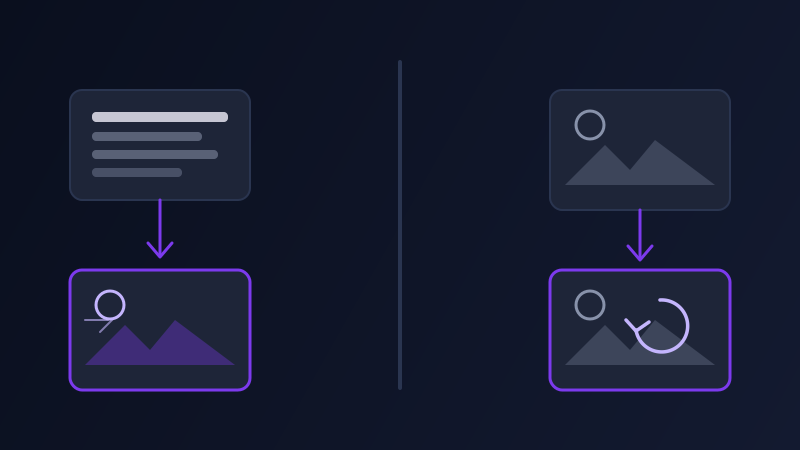
Every AI video tool worth using now supports two different ways to start a clip: type a description and get a scene built from nothing, or upload a photo and have the tool bring it to life. Most people writing prompts treat these as the same task with an optional extra step, describing the scene in both cases and hoping the video tool sorts out the rest. It does not sort out the rest. A text-to-video prompt and an image-to-video prompt are answering different questions, and a prompt written for one produces a specific, predictable kind of bad result when used for the other.
Two different starting points, one shared assumption that breaks
Text-to-video starts from nothing: the model has no visual information until the prompt supplies it, so the prompt has to invent the entire scene, down to lighting and composition, before it can even get to camera movement. Image-to-video starts from something: the model already has a subject, a setting, a color palette, and a composition, all fixed the moment the photo is uploaded. The prompt's job in that second case is not to describe what is already sitting in the reference image, it is to describe what changes from that fixed starting point. Writing both prompts the same way, as a full scene description, treats the second case as though the photo were not there, which is the root of almost every image-to-video prompting problem people run into.
Text-to-video: describing a scene that doesn't exist yet
A text-to-video prompt has to do the work an image-to-video prompt gets for free: subject, setting, lighting, color, and mood all need to be stated, because none of it exists until the words put it there. Skipping this and jumping straight to camera direction, "slow push-in on a woman by a window," leaves the model to invent the woman, the window, the room, and the light entirely on its own, and it will, using whatever generic defaults it reaches for most often. The prompt needs the same visual density an image prompt would need, plus the additional layer video always requires on top: camera movement, subject motion, and duration. Nothing about starting from text lowers the bar on visual specificity, it raises it, because there is no photo quietly filling in the gaps a vague sentence leaves open.
Image-to-video: describing what changes, not what's there
An image-to-video prompt inherits the photo's content, so restating it is wasted words at best and actively confusing at worst. What it actually needs is narrower and more specific than a text-to-video prompt: a camera move (the reference image doesn't establish one on its own), what in the frame should move and how, and how much should stay still. A photo of a still lake at sunset needs a prompt that says "gentle push-in, water rippling softly, clouds drifting slowly, no other movement," not a prompt that re-describes the lake, the sunset, and the color of the sky, all of which the tool can already see. The image has already answered the "what is this" question. The prompt only needs to answer "what happens next."
Why redescribing the image is the single most common mistake
When a prompt re-describes a scene the tool can already see, it does not simply get ignored as redundant. It competes with the actual reference image for influence over the output, and video models weight the two inputs differently depending on the tool, which means the result can drift away from the uploaded photo's actual lighting, color, or composition toward whatever the redundant text description implies instead. A photo shot in cool, overcast light paired with a prompt that happens to mention "warm golden light" as a leftover habit from writing image prompts will often produce a clip that shifts noticeably warmer than the source photo, because the model is trying to honor both an image and a written detail that quietly disagrees with it. The fix is not more caution in the wording, it's leaving that layer out entirely and trusting the image to carry it.

A worked example: the same idea, two prompts
Say the goal is a shot of a cyclist riding along a coastal road at dusk. Starting from text, with no reference image, the prompt needs everything: "A cyclist in a dark jacket rides along a winding coastal road at dusk, ocean visible beyond a low stone wall, sky in deep orange and purple gradients. The camera tracks alongside the cyclist at a steady pace, slightly behind and to the side. Wind moves through the cyclist's jacket and the roadside grass. Warm, low-contrast cinematic lighting, 24fps." Every visual detail is doing real work, because none of it exists otherwise. Starting from an actual photo of that same cyclist and road, the prompt shrinks to what the tool can't already see: "Camera tracks alongside the cyclist at a steady pace. Wind moves through the jacket and roadside grass. Cyclist continues pedaling forward at a consistent speed." The lighting, the color grade, the road, the wall, the ocean are all already sitting in the image. Adding them back into the prompt would only invite the model to negotiate with its own reference.
Tool differences: who supports which starting point
Most current video tools, including Sora, Veo, Runway, Kling, and Luma, support both starting points: a pure text prompt, or an uploaded image paired with a shorter motion-focused prompt. A few, particularly tools built specifically around animating an existing still, lean almost entirely toward the image-plus-motion workflow and expect a much shorter prompt as a result, since a long descriptive prompt against those tools tends to get partially ignored in favor of the reference image anyway. Before writing either kind of prompt, it's worth checking which mode a given tool actually favors, since a tool optimized for image-to-video will not reward the same lengthy scene description that a pure text-to-video tool needs to produce anything specific.
Common mistakes
Writing a full scene description for an image-to-video prompt out of habit, then wondering why the color grade or lighting drifted from the source photo. Writing a short, motion-only prompt for a text-to-video generation with no reference image, and getting a generic scene because nothing told the model what the scene actually looked like. Assuming a strong image-to-video result only needs the photo and no prompt at all, then getting a clip with barely any movement because the tool had no motion instruction to work from beyond a static default. Treating every video tool as supporting the same starting point, and finding out only after a failed generation that the tool in question strongly favors one mode over the other.
Promptima's video prompt generator asks which starting point you're working from before writing anything: a from-scratch text prompt gets the full scene-description treatment, while an uploaded image gets a shorter prompt focused only on camera, motion, and duration, matched to how the target tool actually weighs a reference image against written instructions.
Frequently asked questions
Should I describe the scene in an image-to-video prompt?
Generally no, beyond what has changed. The uploaded image already supplies the subject, setting, lighting, and color, so restating those details doesn't add information — it introduces a second, sometimes conflicting description that competes with the reference image for influence over the output. Focus the prompt on camera movement, what should move, and how much should stay still.
Why does my image-to-video clip look different in color or lighting from the photo I uploaded?
This usually happens when the prompt redescribes visual details, like lighting or color, that don't exactly match the uploaded photo. The model tries to honor both the image and the written description, and when they disagree even slightly, the output can drift toward what the text implies instead of staying true to the source image.
Do text-to-video prompts need more detail than image-to-video prompts?
Yes. A text-to-video prompt has to establish the entire scene, subject, setting, lighting, and color, since none of it exists until the prompt supplies it, on top of the usual camera and motion instructions. An image-to-video prompt already has all of that from the reference photo, so it needs far less visual description and more precision on what changes.
Do all AI video tools support both text-to-video and image-to-video?
Most major tools, including Sora, Veo, Runway, Kling, and Luma, support both. Some tools built specifically around animating an existing still favor image-to-video heavily and expect a much shorter, motion-focused prompt, so a long scene description written for text-to-video can end up partially ignored on those tools.
What happens if I upload an image but write no prompt at all?
Most tools will still generate a clip, but usually with minimal, generic movement, since there's no instruction telling the model what should actually happen in the scene. An image alone establishes what the frame looks like, not what changes over the length of the clip, which is exactly what a short, motion-focused prompt is for.
Try Promptima's video prompt generator — it asks whether you're starting from text or an image before writing the prompt →
✦ Try Promptima freeMore articles

Best AI Prompt Optimizer Tools in 2026 (And When to Use Each)
Prompt marketplaces, browser extensions, manual prompt engineering, and dedicated optimizers all solve a different version of the same problem. Here is how to tell which one you actually need.

How to Turn One Photo Into a Ready-to-Use AI Video Prompt
You have an image whose look you want to bring to life as a video. The problem is that video AI tools don’t read image prompts — they need camera, motion, and duration described in a completely different structure. Here’s how to bridge the two.