How to Write AI Prompts for Video Scripts and Storyboards That Actually Shoot
September 24, 2026 · 9 min read
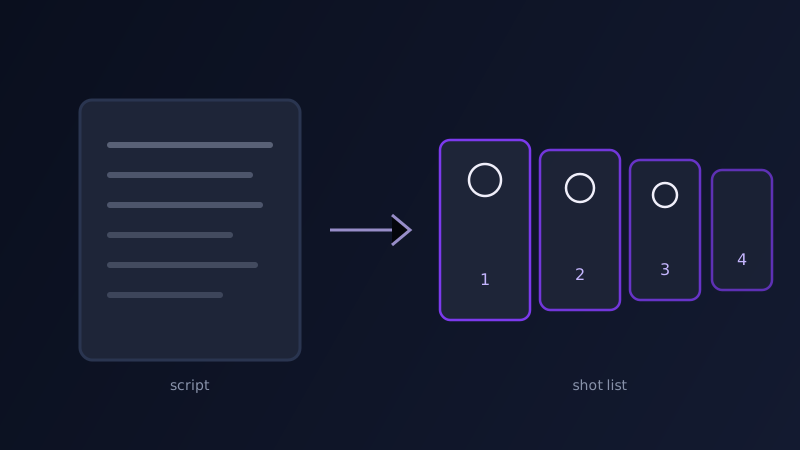
A marketing brief says "we need a 30-second video for the new product launch," someone writes a script that reads well out loud, and then that script gets pasted whole into an AI video tool with an expectant "make this." What comes back is usually one long, unfocused clip that vaguely gestures at the whole script at once, because a script written to be read or spoken is not the same document as a set of instructions an AI video tool can actually turn into a sequence of shots. The gap between the two is not a matter of trimming words. A script describes what is said and roughly what happens; a shootable AI video prompt sequence describes, shot by shot, what the camera sees, for how long, and what changes between the first frame and the last.
Why a script is not a prompt
A script for a 30-second ad might read: "We open on a busy kitchen. Someone reaches for our product. They smile as they use it. Text appears: available now." That is a perfectly good script. It tells a human crew what story to tell. It tells an AI video tool almost nothing usable, because every sentence in it is doing several jobs at once: establishing a location, introducing a character, implying an emotional beat, and cutting to a new shot, all without ever stating where one shot ends and the next begins, how long each one lasts, or what the camera is actually doing while it happens. Most AI video tools generate one continuous clip per prompt, typically just a handful of seconds each. A script written in narrative prose gives a tool no way to know it is supposed to produce four or five distinct clips instead of one confused attempt at all of them.
Breaking a script into shots the way AI video tools expect
The fix is a conversion step most people skip: turning the script into a numbered shot list before it ever becomes a prompt. Read through the script and mark every point where the camera would realistically cut, a new location, a new subject, a change in what is being emphasized, and give each resulting segment its own line. A 30-second script usually breaks into somewhere between four and eight shots once this is done properly, each short enough to fit comfortably within what a single AI video generation actually produces well. This is the same discipline a human storyboard artist applies before a real shoot, and it matters just as much here: the AI tool is, in effect, the camera operator, and a camera operator can only execute one clearly defined shot at a time, not a paragraph describing an entire scene’s worth of action at once.
What each shot description needs
Once the script is broken into shots, each one needs to be rewritten as its own self-contained prompt, not a fragment that only makes sense next to the others. That means naming the subject and setting fresh each time, even if it repeats across shots ("a woman in a gray apron" rather than "she"), specifying one camera movement (static, slow push-in, pan), stating what changes between the start and end of that specific clip, and giving a rough duration if the tool supports one. Shots that are meant to feel connected, an establishing shot followed by a close-up in the same kitchen, need matching language for lighting, color grade, and setting details repeated in both prompts, since the tool generating shot two has no memory of shot one and will otherwise invent its own version of that kitchen.
Keeping continuity across shots without a locked character system
The hardest part of turning a script into an AI-generated sequence is keeping the same product, person, or setting recognizable across shots that are each generated independently. Without a dedicated consistency feature, the most reliable approach is repeating a tight, identical description of the fixed elements, the product’s exact packaging colors, the presenter’s outfit, the location’s key details, in every shot’s prompt rather than trusting the tool to remember. Where a tool offers an image reference or a character-lock feature, feeding it the same reference image across every shot in the sequence works far better than prose alone, the same principle that makes reference photos do most of the work in a consistent-character workflow. Where no such feature exists, keep shots that need to match visually as close together and as similarly worded as possible, and accept that a sequence generated entirely from text alone will drift slightly no matter how carefully it is worded.
A worked example: a 30-second product ad
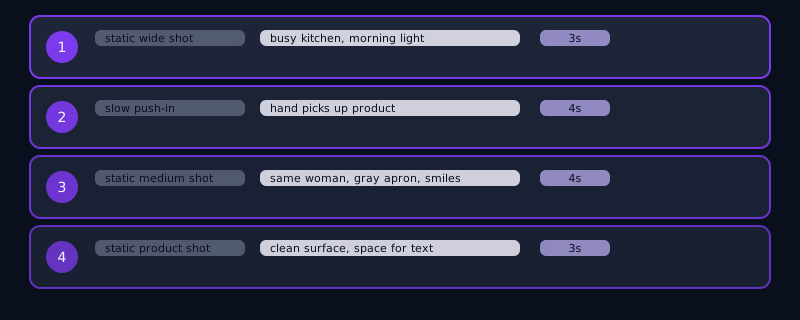
Script line: "We open on a busy kitchen. Someone reaches for our product. They smile as they use it. Text appears: available now." Converted to a four-shot sequence: Shot 1, 3 seconds, static wide shot: "A bright, busy home kitchen in the morning, warm natural light through a window, blurred activity in the background, steam rising from a kettle." Shot 2, 4 seconds, slow push-in: "A woman’s hand reaches into frame and picks up a matte black kitchen tool from the counter, close-up, shallow depth of field, warm natural light matching the previous shot." Shot 3, 4 seconds, static medium shot: "The same woman, gray apron, smiles genuinely as she uses the tool at the counter, soft natural light, kitchen visible but softly blurred behind her." Shot 4, 3 seconds, static: "Clean product shot on a plain light surface, soft studio lighting, empty space above for text overlay." Four short prompts, each self-contained, together reconstructing the original four-line script as something an AI video tool can actually produce.
Common mistakes
Pasting an entire script into one prompt and expecting the tool to produce several distinct beats in a single generation, when most tools render one continuous clip per prompt. Writing shot descriptions that only make sense in context, "she picks it up next," instead of restating the subject and setting fully each time. Skipping camera movement and duration entirely and being surprised the pacing feels random once the shots are stitched together. Assuming a tool will keep a product or person looking the same across shots without either a reference-image feature or a tightly repeated description doing that work, and only discovering the drift after generating all four or five shots instead of testing continuity on the first two.
Frequently asked questions
Can I just paste my whole video script into an AI video tool?
Not effectively. Most AI video tools generate one continuous clip per prompt, typically just a handful of seconds, so a multi-beat script pasted in whole tends to produce one confused attempt at the entire scene rather than the sequence of distinct shots the script actually describes. Breaking the script into a numbered shot list first, then prompting each shot separately, is what actually gets you a usable sequence.
How many shots should a 30-second script break into?
Usually somewhere between four and eight, depending on how many distinct beats, locations, or subjects the script moves through. Mark every point where a real camera would cut, a new location, a new subject, a shift in emphasis, and give each resulting segment its own self-contained prompt rather than trying to compress the whole script into fewer, longer shots.
How do I keep the same product or person looking consistent across multiple AI-generated shots?
Where the tool supports it, feed the same reference image into every shot in the sequence rather than relying on text alone. Where it does not, repeat a tight, identical description of the fixed details, exact packaging colors, the presenter’s outfit, key location details, in every shot’s prompt, since each shot is typically generated independently with no memory of the others.
Do I need to specify camera movement and duration for every shot?
Yes, wherever the tool allows it. Leaving camera movement unspecified means the tool picks a default that is often generic or static, and leaving duration unset frequently produces pacing that feels off once shots are stitched together. Naming one clear camera movement and a rough duration per shot gives a far more predictable, editable result than describing a whole scene’s motion in a single unstructured paragraph.
Try Promptima’s Prompt Chains, turn one idea into a full shot-by-shot AI video prompt sequence →
✦ Try Promptima freeMore articles

Best AI Prompt Optimizer Tools in 2026 (And When to Use Each)
Prompt marketplaces, browser extensions, manual prompt engineering, and dedicated optimizers all solve a different version of the same problem. Here is how to tell which one you actually need.

How to Turn One Photo Into a Ready-to-Use AI Video Prompt
You have an image whose look you want to bring to life as a video. The problem is that video AI tools don’t read image prompts — they need camera, motion, and duration described in a completely different structure. Here’s how to bridge the two.